How IVE works
IVE has two parts that work together. The Extension watches the video you are playing, on any site, and The Companion turns that into motion on your device. Setup takes about five minutes. This page walks you through it.
From zero to synced
Four steps: install The Companion, add The Extension, connect your device, and play something.
Install The Companion
Download The Companion from the download section and run the installer. It is the part that talks to your devices and stores your library, so keep it running while you play. It updates itself when a new version is out.
Add The Extension
Install The Extension from the Chrome Web Store for Chrome, Edge and Brave, or from addons.mozilla.org for Firefox. One click to install, and your browser keeps it updated automatically.
The Extension finds The Companion on its own. Once both are running the connection lights up, no configuration needed.
Connect your device
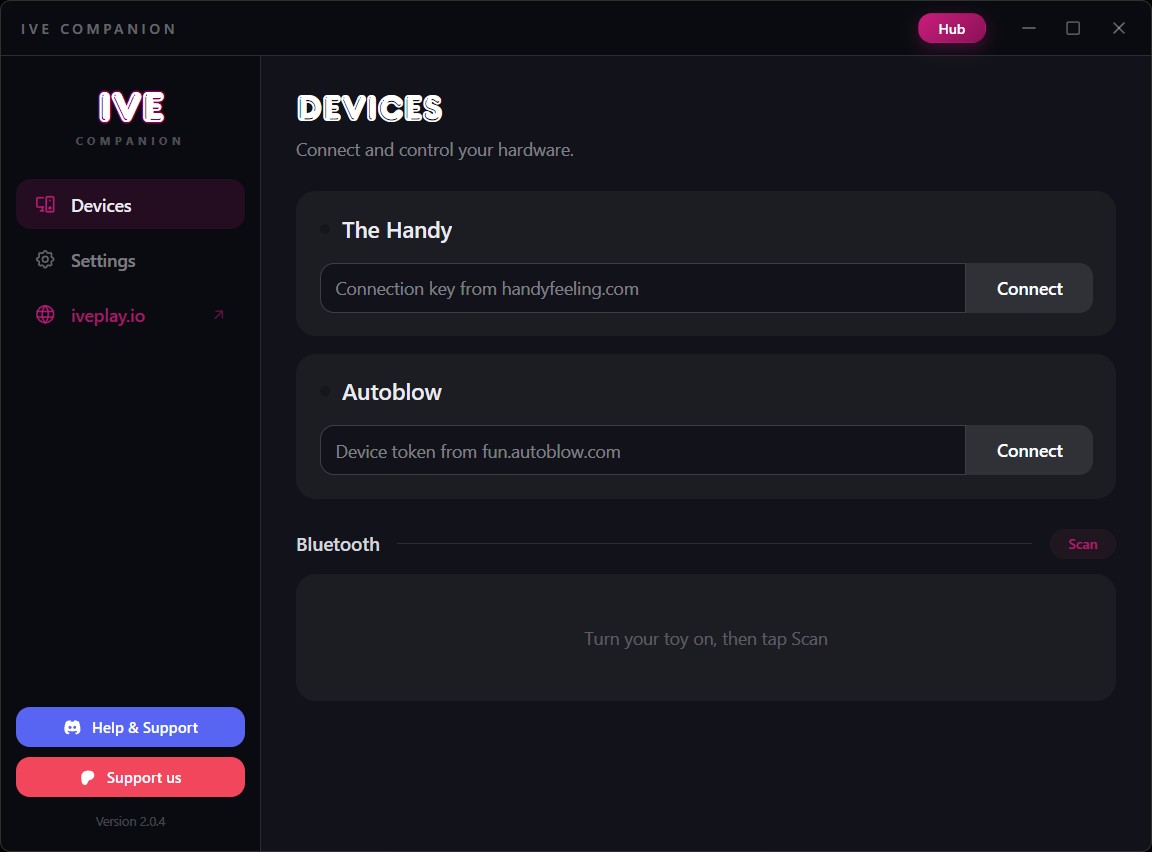
All devices connect in The Companion, on the Devices page. Pick whichever applies to you:
The Handy
Get your connection key from handyfeeling.com after setting up your Handy, paste it into the Handy panel and hit connect. Once connected you can tune the stroke range and timing offset to your liking.
Only Handy firmware 4 (FW4) is supported.
Autoblow
Get your device token from fun.autoblow.com after setting up your Autoblow, paste it into the Autoblow panel and hit connect.
Bluetooth toys
Lovense, Kiiroo, Satisfyer and hundreds of other Bluetooth toys connect directly, no extra software needed. Turn your toy on, press Scan, and it appears in the list within seconds. Bluetooth support is powered by the open source Buttplug library.
You can connect several devices at once and control each one's intensity individually.
Play something
Scripts can come from a few places, all of them one click:
- Script sites: on EroScripts, IVDB, FapTap, FunScriptHub and PMVHaven, the IVE panel appears on script and video pages whenever The Companion is running. Pick a script, press play, and the video starts fully synced.
- The Hub: search the whole catalog and play straight from the results.
- Your own files: add videos and funscripts to the library in The Companion, or through the local hub.
That is the whole setup. While playing, The Extension gives you the floating player, the heatmap and script controls. The features below explain each one.
The tools you'll use the most
Once you are set up, these are the controls that shape every session.
Load panel
On supported script sites the IVE panel appears automatically whenever The Companion is running. It detects the scripts and videos on the page: pick a combination and press play.
Not in the mood? Dismiss it and it stays away for that site until the next visit.
Floating player
IVE ships its own video player for sites where the built-in one is a pain. It supports fullscreen, theater mode, resizing, and dragging anywhere on the screen.
Open it with the Float a video button in the extension popup, then pick the video on the page. It also works great without any script or device connected.
Heatmap and invert
The heatmap shows the script's intensity along the video timeline, so you can see at a glance where the action peaks. Toggle it in the player controls.
Prefer the opposite motion? The invert toggle flips the whole script, and your choice is remembered.
Library
The Companion keeps a local library of your videos and scripts. Add entries from the local hub, favorite the keepers, and replay them any time. Everything stays on your machine.
The Hub
The Hub is a searchable catalog of thousands of scripted videos, gathered from all the major script sources and updated daily. Search, filter by tags or device, and play in one click.
Hub access is a perk for supporters on Patreon.
More on the way
IVE updates land regularly with new device support, new site integrations and new features. Follow the Patreon or Discord to see what is coming next.
Frequently asked questions
The short answers. For anything else, the Discord is the fastest way to get help.
Which browsers does IVE support?
Do I need The Companion app?
Which devices work with IVE?
Do I still need Intiface Central?
My Handy won't connect or sync. What's wrong?
Why isn't my script syncing properly?
Can I use my own script files?
What do I get for supporting on Patreon?
Is my data safe with IVE?
Where can I get more support?
Made by one person
IVE is built and maintained by a single developer. Patreon support is what funds new device integrations, more site support and the time to keep everything working. If IVE made your evenings better, this is the best way to say thanks.
Questions, bugs or device requests? The Discord community is active and friendly.